
.png)
Description
Скачать Tatship AI Tattoo Generator – Инструмент для создания татуировок на базе ИИ, бесплатный предварительный просмотр и настройка
Обзор
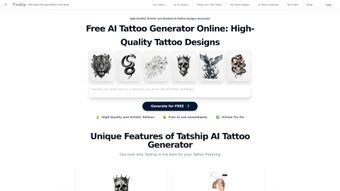
Tatship AI Tattoo Generator – это передовая веб‑платформа, которая помещает мощность искусственного интеллекта прямо в руки любителей тату и профессиональных художников. В отличие от обычных графических редакторов, опирающихся на статичные библиотеки клип‑артов, движок глубокого обучения Tatship обучен на миллионах реальных изображений тату, охватывающих традиционное японское ирезуми, смелый американский традиционный стиль, изящные линии, акварельные техники и новейшие минималистские тенденции. Такой объём данных позволяет системе понимать тонкие нюансы, такие как толщина линий, градиенты теней, культурные символы и даже поведение пигмента на разных тонах кожи.
Рабочий процесс преднамеренно прост: пользователи начинают с ввода текстового запроса, выбора ключевых слов стиля или загрузки референс‑борда. ИИ обрабатывает эти входные данные, сочетает их со своей внутренней базой стилей и за секунды генерирует три концепции высокого разрешения. Каждую концепцию можно доработать с помощью интуитивного редактора на экране, где можно регулировать толщину линий, менять цвета или объединять несколько набросков в одну композицию. Особенностью является виртуальная примерка, которая накладывает дизайн на фотографию выбранной части тела, автоматически учитывая изгиб, перспективу и тон кожи. Этот визуальный предварительный просмотр помогает избавиться от догадок, которые часто приводят к сожалениям после нанесения иглы.
Для тех, кто предпочитает ощутить дизайн перед окончательным решением, Tatship предлагает сервис временных тату. После финализации дизайна вы можете заказать печатный трафарет, который прилипает к коже на несколько дней, позволяя увидеть, как artwork ощущается и выглядит в реальной жизни. Все эти возможности работают в безопасной облачной среде, что означает отсутствие тяжёлого программного обеспечения для установки и автоматическое получение обновлений. Платформа соответствует стандартам GDPR и CCPA, шифрует все данные в пути и в состоянии покоя, а проекты хранятся в дата‑центрах, сертифицированных по ISO‑27001. Независимо от того, генерируете ли вы идеи для первой татуировки или предоставляете отшлифованные концепции клиентам в загруженной студии, Tatship AI Tattoo Generator обеспечивает надёжную, креативную и безрисковую среду на каждом этапе пути создания тату.
Ключевые функции и как это работает
- AI‑Driven Design Engine: Utilizes transformer‑based deep‑learning models trained on a curated dataset of over 5 million tattoo images, ensuring the generated artwork respects traditional techniques while embracing modern trends.
- Personalized Prompt System: Accepts natural‑language descriptions, style tags, and color palettes, translating them into visual concepts that reflect the user’s unique aesthetic.
- Virtual Try‑On: Real‑time body‑mapping technology overlays the design on a user‑uploaded photo, adjusting for skin tone, curvature, and lighting for a photorealistic preview.
- Design Customization Tool: Layer‑based editor lets you merge multiple AI drafts, add hand‑drawn sketches, import logos, or fine‑tune shading and line weight with pixel‑perfect control.
- Temporary Tattoo Preview: Order a custom‑printed temporary stencil that adheres for 2‑5 days, providing a low‑commitment way to test placement, size, and color saturation.
- High‑Resolution Export: Export designs as SVG vectors for unlimited scaling or as PNG/PDF raster files for immediate printing and stencil creation.
- Secure Cloud Storage: Encrypted project vaults keep every iteration safe, with one‑click backup and export options for offline archiving.
- Continuous Learning Updates: Weekly model refreshes incorporate the latest tattoo trends, new style vocabularies, and improvements in color accuracy.
How the AI Generates a Tattoo Design
The generation pipeline begins with the user’s input—whether it’s a short phrase like “vivid koi fish with teal splashes” or a curated mood board of reference photos. The system first runs a multimodal encoder that extracts visual features from images and linguistic cues from text. These embeddings are fed into a transformer model that has learned the relationship between style descriptors and tattoo anatomy (line work, shading, negative space). The model then produces a set of latent vectors, each representing a potential composition.
An internal aesthetic scoring engine, built from feedback collected from professional tattoo artists, evaluates each latent vector for balance, readability, and suitability for skin application. The top three vectors are decoded into full‑resolution raster images, which are instantly displayed to the user. From there, the on‑screen editor allows you to adjust line thickness, recolor palettes, or combine elements from multiple drafts. Once satisfied, the design can be saved to the cloud, exported in the desired format, or sent directly to the temporary‑tattoo printing service. Because the heavy computation occurs on Tatship’s servers, the client device only handles UI rendering, ensuring fast response times even on modest hardware.
Installation, Usage Instructions & Compatibility
Getting Started – No Download Required
Tatship AI Tattoo Generator is fully web‑based, which means you can start creating immediately from any modern browser without installing additional software. The platform is optimized for HTML5, WebGL, and responsive design, so it works equally well on desktops, laptops, tablets, and smartphones.
- Open your preferred browser (Chrome, Edge, Firefox, or Safari) and navigate to tatship.com.
- Click “Sign Up” and choose either email registration or a social‑login option (Google, Facebook, Apple) for quick access.
- Complete the onboarding questionnaire, which asks about your favorite tattoo styles, preferred color palettes, and any reference images you wish to upload.
- From the dashboard, select the “Create” tab. Type a detailed prompt, drag‑and‑drop reference pictures, or select from pre‑built style templates.
- Press “Generate” and watch the AI produce three distinct concepts within 5‑10 seconds.
- Use the built‑in editor to tweak line weight, adjust shading, swap colors, or merge elements from multiple drafts.
- When the design meets your expectations, click “Export” to download SVG, PNG, or PDF files, or choose “Order Temporary Tattoo” to receive a physical preview within 3‑5 business days.
- For recurring studio use, you can enable the optional Electron wrapper (downloadable from the “Desktop App” section) which provides a native‑look experience while still leveraging cloud processing.
Device Compatibility (Windows, macOS, iOS, Android, Web)
Because all intensive AI calculations run on Tatship’s servers, the client side only needs to support modern web standards. The platform has been tested on the following environments:
- Windows 10/11 – Chrome, Edge, Firefox, or Safari (via Windows Safari preview).
- macOS 12+ – Safari, Chrome, or Firefox.
- iOS 14+ – Safari or Chrome on iPhone/iPad.
- Android 9+ – Chrome or Firefox.
Even low‑end smartphones can generate complex designs without noticeable lag because the rendering is off‑loaded to the cloud. Studios that prefer a desktop‑only workflow can install the optional Electron wrapper, which provides a lightweight windowed application for Windows or macOS while preserving all cloud features.
Security, Updates & Data Privacy
All communication between your device and Tatship’s servers is encrypted with TLS 1.3. Projects are stored in an ISO‑27001‑certified data center, and each file is encrypted at rest using AES‑256. The platform complies with GDPR, CCPA, and other regional privacy regulations, giving you full control over data export and deletion through the account settings panel. Software updates—including AI model refreshes, UI improvements, and security patches—are pushed automatically, eliminating the need for manual downloads or installations.
Pros, Cons & Frequently Asked Questions
Pros
- Generates truly unique designs tailored to individual preferences and style cues.
- Virtual try‑on provides a realistic preview of placement, size, and skin tone interaction.
- Fully web‑based – no heavy software download or local GPU requirements.
- High‑resolution vector export (SVG, PDF) suitable for professional stencil creation.
- Temporary‑tattoo service allows low‑risk physical testing before permanent ink.
- Secure cloud storage with GDPR and CCPA compliance.
- Weekly AI model updates keep the library fresh with the latest tattoo trends.
- Optional desktop wrapper for studios that want a native‑app feel.
Cons
- Requires a stable internet connection; offline usage is not supported.
- Advanced graphic editing tools are less extensive than dedicated software like Adobe Illustrator.
- Free tier limits daily generations; unlimited access requires a premium subscription.
- Temporary‑tattoo preview incurs additional shipping costs and a short lead time.
- Complex designs with very fine detail may need manual refinement by a skilled artist.
Frequently Asked Questions
Can I use Tatship for commercial tattoo studio projects?
Yes. The premium subscription includes a commercial‑use license, allowing studios to sell AI‑generated designs to clients without additional royalties.
How accurate is the virtual try‑on feature?
The try‑on uses facial‑recognition and body‑mapping algorithms that adjust for skin tone, curvature, and perspective. While it provides a very realistic preview, final ink may appear slightly different due to skin healing and pigment depth.
Is my personal artwork safe when I upload it?
All uploads are encrypted at rest and in transit. Tatship does not share or sell your images, and you retain full ownership of any designs you create.
Can I export designs as vector files for scaling?
Yes. The platform offers SVG and PDF export options, which preserve line quality at any size—ideal for stencil creation or large‑format artwork.
What if I’m not satisfied with the generated tattoo?
You can regenerate unlimited variations on the free tier (up to 3 per day) or request a custom refinement with the premium service, where a dedicated AI specialist assists you in fine‑tuning the design.
Is there a mobile app for Tatship?
Tatship is optimized for mobile browsers, so there is no separate app to install. The responsive web interface works seamlessly on iOS and Android devices.
Conclusion & Call to Action
Tatship AI Tattoo Generator bridges the creative gap between inspiration and execution, offering a secure, fast, and highly customizable environment for anyone interested in tattoo design. The combination of an AI‑driven engine, realistic virtual try‑on, and a physical temporary‑tattoo preview makes the decision‑making process both enjoyable and low‑risk. While the requirement for an internet connection and the limited offline capability may be a drawback for users in low‑bandwidth regions, the benefits of continuous model updates, cross‑platform accessibility, and professional‑grade export options outweigh these concerns for the majority of artists and hobbyists.
If you’re ready to transform your ideas into vivid, personalized artwork, start your free trial today. Upgrade to the premium plan for unlimited generations, commercial licensing, priority support, and faster temporary‑tattoo shipping. Experience the future of tattoo design and give your clients the confidence that comes from seeing exactly how their next piece will look—before the needle even touches the skin.
Guides & Tutorials for Tatship AI Tattoo Generator
How to install Tatship AI Tattoo Generator
- Click the Preview / Download button above.
- Once redirected, accept the terms and click Install.
- Wait for the Tatship AI Tattoo Generator download to finish on your device.
How to use Tatship AI Tattoo Generator
This software is primarily used for its core features described above. Open the app after installation to explore its capabilities.
User Reviews for Tatship AI Tattoo Generator 0
No reviews found




